
CAM inside the same window
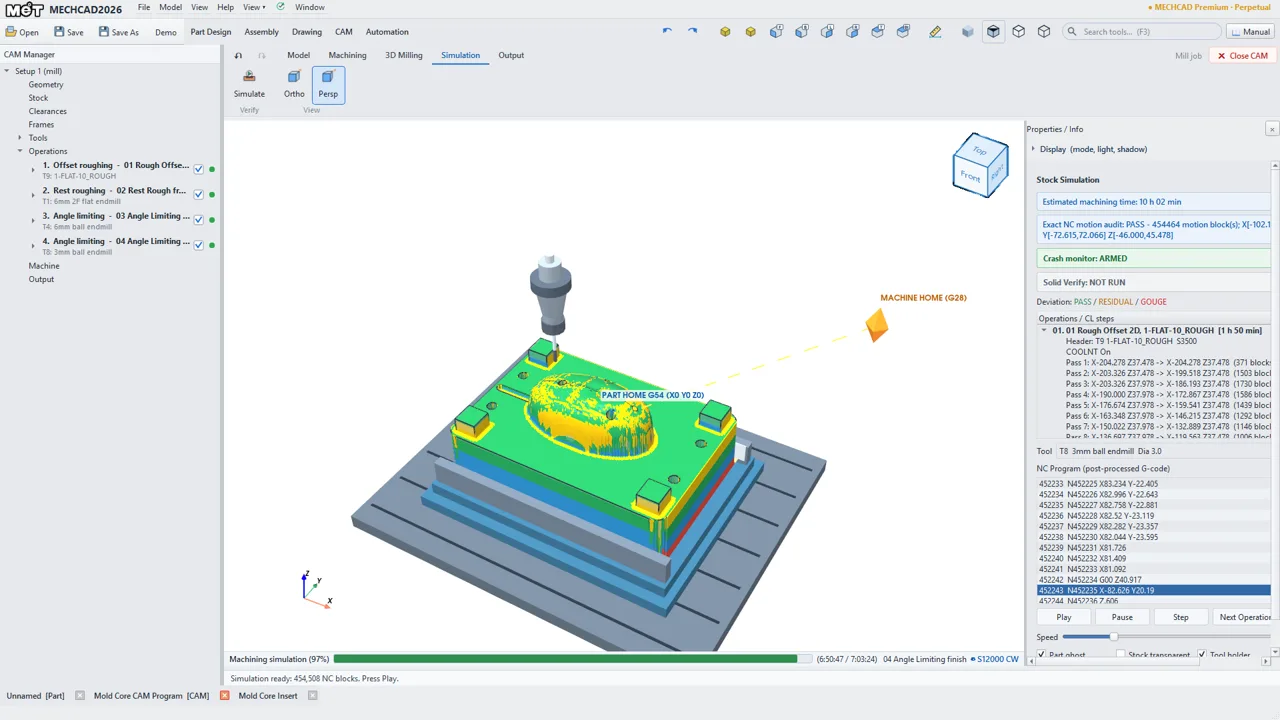
3-axis milling (2.5D and 3D) and 2-axis turning with cut simulation, G-code and a Shop PDF setup sheet, in Premium.
MECHCAD 2026 · FOR ALIBRE DESIGN USERS
Keep designing in Alibre Design. When a part needs to go to the mill or the lathe, MECHCAD opens the .AD_PRT directly and takes it through toolpaths, simulation and G-code in one window. MET is an Alibre partner and still recommends Alibre Design to customers who prefer a proven US brand. MECHCAD is our Thai-brand product, and the two work together.
Design and save your part in Alibre Design as usual. Your Alibre file is only read, never changed.
Open the .AD_PRT in MECHCAD. Alibre does not need to be installed on that PC. You get sketches and features where they can be rebuilt, otherwise the exact solid.
In the CAM tab, set the stock and tools, add operations, simulate, then post G-code and print the setup sheet.
Editable import needs MECHCAD Standard or higher, or the trial. CAM needs Premium or the trial.
| File | Result in MECHCAD |
|---|---|
| Part with feature history (.AD_PRT) | Sketches, features and most sketch dimensions, using the active configuration. Steps that cannot be rebuilt stay as exact geometry and are listed in the Import Summary. |
| Part that is only an imported body (.AD_PRT) | The exact solid. There is no history in the file to rebuild. |
| Assembly (.AD_ASM) | Converted to MECHCAD parts and an assembly, with positions kept. Mates are not converted: components are grounded, and nested assemblies come in as rigid groups. |
| Drawing (.AD_DRW) | Not supported. Make a new drawing from the model in MECHCAD. |
| Sending work back to Alibre | MECHCAD does not write Alibre files. Export STEP to share the shape; features do not carry over. |
3-axis milling (2.5D and 3D) and 2-axis turning with cut simulation, G-code and a Shop PDF setup sheet, in Premium.
Where features rebuild, change a sketch dimension or feature value in MECHCAD, press Update Geometry in the CAM job, review and post.
MECHCAD also opens SolidWorks parts, so one PC can program work from customers on either system.
Our own test, October 2026: 150 parts with feature history from MET’s archive, not used during development. 116 of the 148 that could be graded opened fully editable, and all 148 matched the Alibre shape once exact geometry filled the gaps. Your files will differ, so try the trial on a real one.
| Edition | Alibre parts | CAM | Price |
|---|---|---|---|
| Lite | Opens as an exact solid | No | ฿3,490 a year ($99) |
| Standard | Editable sketches and features | No | ฿34,900 perpetual ($990), or ฿13,900 a year ($390) |
| Premium | Editable sketches and features | Mill and lathe | ฿99,000 perpetual ($2,790), or ฿39,900 a year ($1,190) |
THB prices include 7% VAT. USD is shown for reference.
Yes. MECHCAD reads .AD_PRT and .AD_ASM files itself and never starts Alibre.
Yes. You can design in Alibre and machine with MECHCAD. Your Alibre files are only read, and MET continues to sell, train and support Alibre Design.
Parts with feature history are rebuilt as sketches and features where possible, and the Import Summary lists anything kept as exact geometry. Parts that are only an imported body open as the exact solid.
.AD_PRT and .AD_ASM are supported; .AD_DRW is not. MET tests on its own archive and does not publish a certified version list. If the reader does not recognise a file, it tells you and you can export STEP from Alibre instead.
Not automatically, and there is no live link to Alibre. Open the changed file in MECHCAD, update the job’s geometry, review the operations and stock, then simulate again.
The built-in posts are Fanuc (mill and lathe), basic ISO, GRBL and LinuxCNC, and most can be edited to match your machine. If yours is not listed, ask us.
Yes. The free 30-day trial is full Premium, including CAM. Start it from the Welcome screen with your name and e-mail, once per computer and per e-mail.
MECHCAD runs on Windows 10/11 64-bit. Activation needs an internet connection, and the licence must reach the MET licence server at least once every 7 days. Your files are read and processed on your own PC.
The trial is full Premium for 30 days. Questions about a part or about using both programs? Contact us; what you share with us is kept confidential.
MECHCAD is developed by the MET Dev team at Mechatronics Designed Co., Ltd., with more than 20 years of machine-design experience.
Alibre and SolidWorks are trademarks of their owners and are used here only to describe the files MECHCAD reads. MET is an Alibre partner; MECHCAD is MET’s own product and is not made by Alibre. MET is not affiliated with the owner of SolidWorks.
ALIBRE DESIGN OR MECHCAD
PROVEN US BRAND · MET IS AN ALIBRE PARTNER
For customers who prefer a proven 3D CAD brand from the USA. MET remains an Alibre partner and fully recommends and supports Alibre Design: sales, installation, training and local support in Thailand.
Explore Alibre DesignTHAI BRAND · DEVELOPED AND SUPPORTED BY MET
For customers who prefer a Thai brand. MECHCAD (3D CAD/CAM) and MCAD (2D) are developed in Thailand by the MET team, with local development and support.
Explore MECHCADThe two work together: MECHCAD opens Alibre parts and assemblies (.AD_PRT / .AD_ASM), so teams on either program can share files. Whichever you choose, the MET team will help you pick what fits your work. Talk to MET