
Machine shops and fabricators
You receive SolidWorks parts from customers and need to adjust a hole, a depth or a chamfer before making them.
MECHCAD 2026 · EDIT SOLIDWORKS PARTS
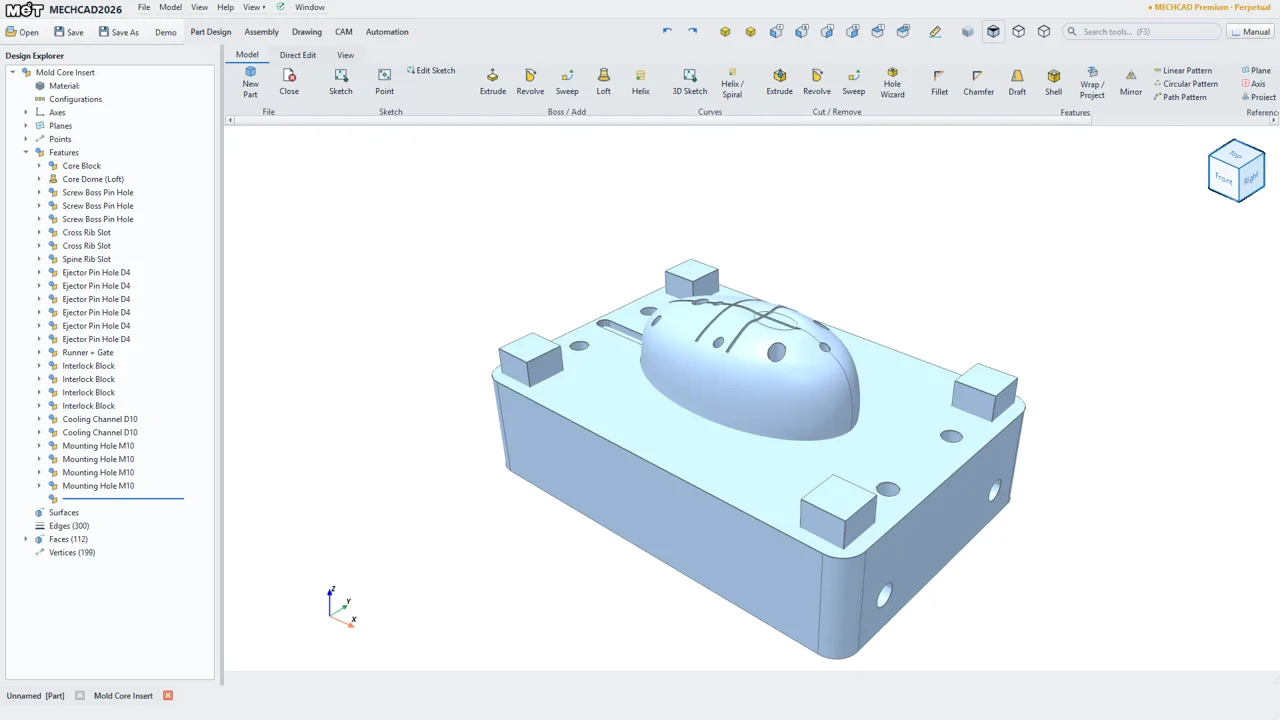
A customer sent an .SLDPRT and you need to change it before quoting or cutting? MECHCAD reads the file itself and rebuilds the part as sketches and features you can edit. Anything it cannot rebuild stays as exact geometry and is listed for you, so you always know which parts of the tree are live.
Editable import needs MECHCAD Standard or higher, or the trial. The original file is only read, never changed.
| File | Result in MECHCAD |
|---|---|
| Part (.SLDPRT) | Sketches and a feature tree where features can be rebuilt. The rest stays exact geometry and is listed in the Import Summary. If nothing can be rebuilt, you get the exact solid. |
| Assembly (.SLDASM) | Converted to MECHCAD parts and an assembly, with component positions kept. Each part arrives as an exact solid, without a feature tree. Mates are not converted: components are placed and grounded. The part files must be next to the assembly or in a folder near it. |
| Drawing (.SLDDRW) | Not supported. Make a new drawing from the model in MECHCAD. |
| Saving back to SolidWorks | Not supported. Save as a MECHCAD file (.metprt) or export STEP, IGES, SAT or STL. Drawings export to PDF, DXF and DWG. |
MECHCAD checks every rebuilt step against the solid stored in the same file.
| Result | Feature types |
|---|---|
| Can rebuild as editable features | Extrude (boss and cut), revolve, Hole Wizard holes (as a revolved cut at each hole centre), linear and circular patterns, mirror, fillet, chamfer. Rebuilding depends on the file, so a feature of these types can still stay fixed. |
| Stays exact geometry, listed for you | Sweep, loft, shell, helix, thin-feature extrudes, sketches with splines, and sheet-metal features. |
| Sketches | Points, lines, arcs and circles come across. The SolidWorks sketch dimensions and relations do not, so add your own dimensions in MECHCAD if you need them. |
| Cosmetic threads | Kept as a note, with no geometry. |
Download and install MECHCAD 2026, then press Start 30-day Premium trial on the Welcome screen.
Choose File › Open and pick the .SLDPRT. The rebuild runs in the background with progress and a Cancel button, then the Import Summary lists what stayed fixed.
Double-click a feature or sketch, change it, then Save As .metprt or export STEP. From there you can make a drawing or, in Premium, go to CAM.
You receive SolidWorks parts from customers and need to adjust a hole, a depth or a chamfer before making them.
You need to check a model, measure it and try a small change without waiting for the sender to convert the file.
You keep SolidWorks files from past projects and only need to reopen and change them from time to time.
Our own test, October 2026: 150 parts picked at random from MET’s production archive. 145 were read; about 7 in 10 features rebuilt as editable features; about 3 in 10 parts rebuilt completely; the final solid matched the original on 142 of the 145. Your files will differ, so try the trial on a real one.
| Edition | SolidWorks parts | Price |
|---|---|---|
| Lite | Opens as an exact solid, with no feature tree. You can add new features on top and export STEP. For personal use or businesses under USD 50k annual revenue. | ฿3,490 a year ($99) |
| Standard | Editable sketches and features, plus parts, assemblies and drawings. | ฿34,900 perpetual ($990), or ฿13,900 a year ($390) |
| Premium | Everything above plus Expert tools and mill and lathe CAM. | ฿99,000 perpetual ($2,790), or ฿39,900 a year ($1,190) |
THB prices include 7% VAT. USD is shown for reference.
Yes. MECHCAD has its own reader for the file, so SolidWorks does not need to be installed and is never started.
Usually a mix. Features MECHCAD can rebuild become editable sketches and features. The rest stays as exact geometry, named after the original features and listed in the Import Summary. If nothing can be rebuilt, you get the exact solid.
You can change feature values such as an extrude depth or a fillet size, and edit the sketch geometry. The SolidWorks sketch dimensions and relations do not carry over, so add your own in MECHCAD where you need them.
No. Save as a MECHCAD file (.metprt), or export STEP, IGES, SAT or STL to share with others. A STEP file carries the shape, not the features.
The reader handles both file layouts SolidWorks has used: 2014 and older, and 2015 and newer. MET tests on its own production archive rather than on every release, so there is no certified version list, and a very new file may rebuild less or open only as a solid. Assemblies from around SolidWorks 2009 or earlier may not open. The trial is the best test.
Yes, with component positions kept. Each part comes in as an exact solid and mates are not converted, so components are grounded. To get editable features for one part, open its .SLDPRT on its own.
No. Open the part or assembly and make a new drawing from it in MECHCAD.
MECHCAD tells you why and keeps running. Ask the sender for a STEP export, which opens as a solid, or contact us about the file.
There is a free 30-day trial of full Premium, CAM included, started from the Welcome screen with your name and e-mail (once per computer and per e-mail). After that you need a paid licence. Without one, MECHCAD still opens as a free viewer: you can look at files, but not save or export.
MECHCAD runs on Windows 10/11 64-bit. Activation needs an internet connection, and the licence must reach the MET licence server at least once every 7 days. Your files are read and processed on your own PC.
The trial is full Premium for 30 days. Not sure about a particular file? Contact us about it; what you share with us is kept confidential.
MECHCAD is developed by the MET Dev team at Mechatronics Designed Co., Ltd., with more than 20 years of machine-design experience.
SolidWorks and Alibre are trademarks of their owners and are used here only to describe the files MECHCAD reads. MET is an Alibre partner and is not affiliated with the owner of SolidWorks.