
Customer files, in one place
Open STEP, IGES, SolidWorks and Alibre parts directly. Native parts open as editable features where they can be rebuilt, otherwise as exact solids.
MECHCAD PREMIUM · CAD/CAM FOR MACHINE SHOPS
Model a part or open a customer’s file, then program the mill or the lathe in the same window. MECHCAD Premium covers 3-axis milling and 2-axis turning, with cut simulation, G-code and a setup sheet for the operator. It runs on your Windows shop PC, on a perpetual or yearly licence.
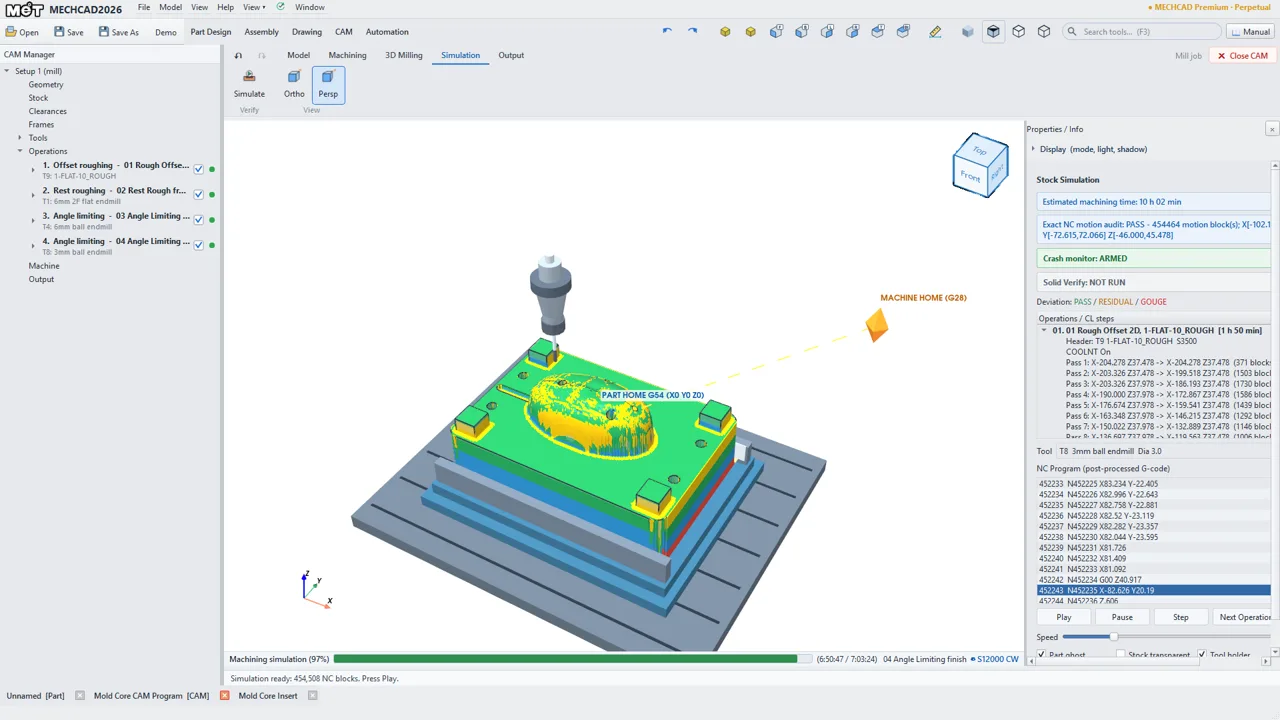
CAM is part of MECHCAD Premium and the 30-day trial.
| Area | Operations |
|---|---|
| 2.5D milling | Face, pocket, profile, ramp cut, slot, step, chamfer, corner round, engrave, thread mill. Drilling with Smart Hole and G81, G82, G83 or G73 cycles. Cutter compensation G41/G42. |
| 3D milling | Offset rough, plunge rough, rest rough, Z-level finish, raster finish, angle-limited finish, flat land, pencil. |
| Turning | Face, rough (G71), finish (G70), groove (G75), thread (G76, G92 or G32), axial drill, part off. |
| Checking | Material-removal simulation with collision checks. Setup checks stop G-code when a job has errors such as a missing tool or a zero feed. |
| Output | G-code, plus a Shop PDF setup sheet with stock, work offset, tool list, operation list and estimated time. |
| Posts | FANUC_MET 3Axis, Fanuc lathe, Fanuc basic (metric and inch), Fanuc 15i 3-axis, basic ISO, GRBL, LinuxCNC. Most can be edited as a G-code pattern, so you can match your own header and tool-change format. |
Open STEP, IGES, SolidWorks and Alibre parts directly. Native parts open as editable features where they can be rebuilt, otherwise as exact solids.
A CAM job stays linked to its part. If the source file has changed, MECHCAD will not post G-code until you press Update Geometry and review the operations and stock.
Premium includes parts, assemblies and production drawings, so fixtures and inspection drawings can stay in the same program.
Lite, Standard and Expert do not include CAM.
| Licence | Price |
|---|---|
| Perpetual, with the first year of maintenance | ฿99,000 ($2,790) |
| Maintenance renewal (optional; without it you keep your last version) | ฿23,900 a year ($690) |
| Or a yearly subscription | ฿39,900 a year ($1,190) |
THB prices include 7% VAT. USD is shown for reference.
Yes. The 30-day trial is full Premium, including mill and lathe CAM, and it is free. Start it from the Welcome screen with your name and e-mail, once per computer and per e-mail.
3-axis mills and 2-axis lathes. The built-in posts are Fanuc (mill and lathe), basic ISO, GRBL and LinuxCNC, and most can be edited to match your machine. If yours is not listed, ask us before you buy.
No. MECHCAD CAM is for 3-axis milling and 2-axis turning.
Yes, in Premium or the trial. The file opens as a part through the importer, then becomes the CAM part. Neither SolidWorks nor Alibre needs to be installed.
Press Update Geometry, review the operation selections and stock, then simulate again. If the source file has changed, MECHCAD stops you posting until you have done this.
You keep the licence for good, with the first year of maintenance included. Updates are free while maintenance is active. After that you keep using your last version and can renew later if you want.
For activation, and then at least once every 7 days for the licence check. You can work offline between checks, and your files stay on your PC.
Yes, Windows 10/11 64-bit.
Install the trial and run one of your parts through to G-code. Not sure it fits your shop or your controller? Contact us about the job; what you share with us is kept confidential.
MECHCAD is developed by the MET Dev team at Mechatronics Designed Co., Ltd., with more than 20 years of machine-design experience. Covered by DEVELOP3D
SolidWorks, Alibre, Fanuc, GRBL and LinuxCNC are names of their respective owners and are used here only to describe file formats and G-code dialects. MET is an Alibre partner and is not affiliated with the other owners.