
ใช้ทำอะไร
แท็บ Assembly ใช้ประกอบ Part และ Sub-Assembly เข้าด้วยกันด้วย Mate ลากชิ้นส่วนให้เคลื่อนตามข้อต่อ ระเบิดภาพ (Explode) และส่งต่อไปทำ Drawing / BOM บันทึกเป็น .metasm
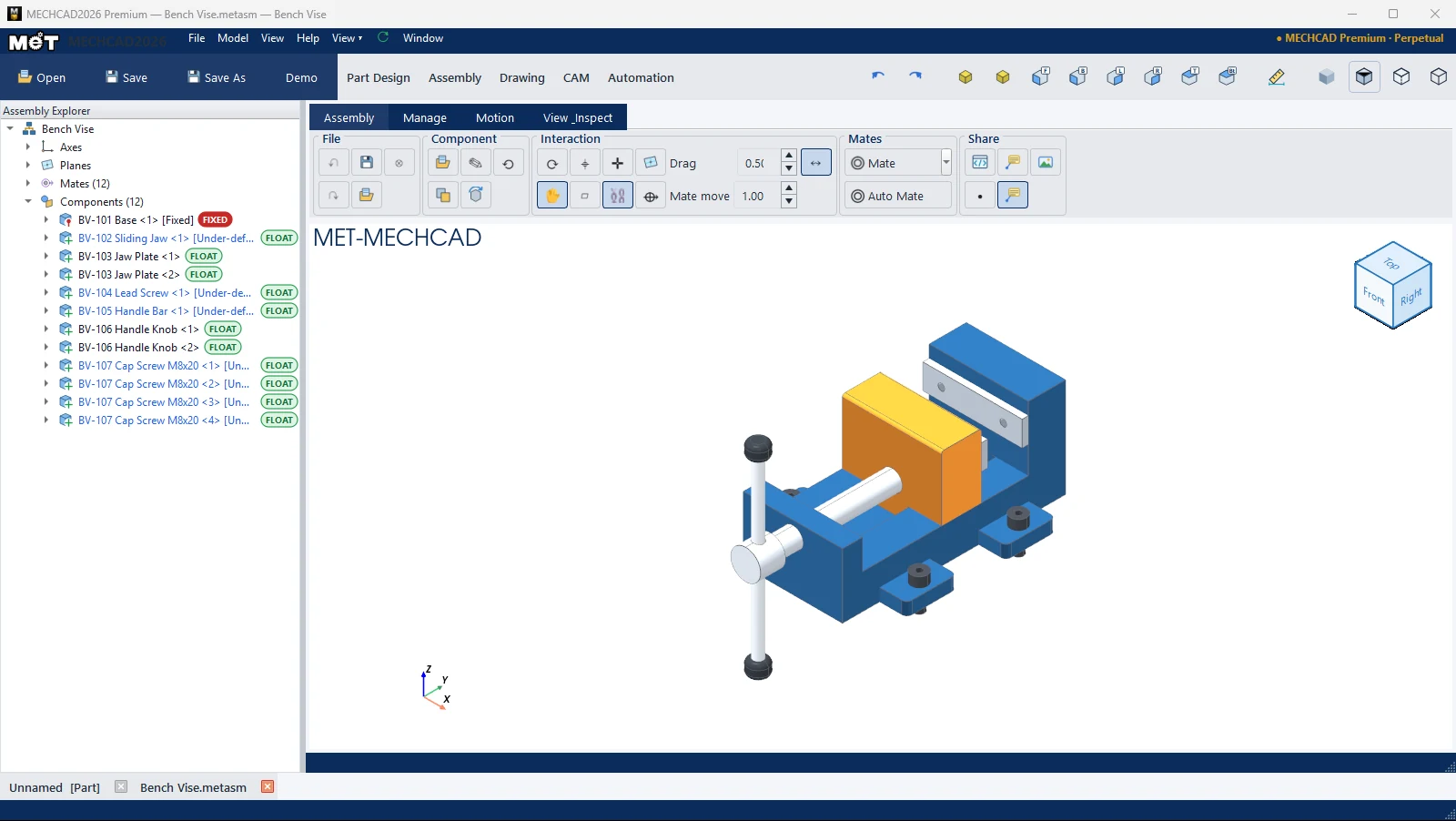
Ribbon ของ Assembly




| แท็บ › กลุ่ม | คำสั่ง |
|---|---|
| Assembly › File | Undo, Redo, Save, Load, Close |
| Assembly › Component | Insert Part, Duplicate, Open Part, Reload Part, Update Sub-Asm |
| Assembly › Interaction | Regen, Drag Part, Axis Connector, Plane, Axis, Show Mates, Show Datums, Mate Axis, Drag (ความไว), Mate move (ความเร็ว), Min Motion |
| Assembly › Mates | Mate (ปุ่มแยกพร้อมรายการชนิด Mate), Auto Mate |
| Assembly › Share | Export HTML, Export STL, 3D Notes, Show Notes, Picture |
| Manage › Mate Connector | Add Connector, Flip Z, Rotate 90 |
| Manage › Assembly Tools | Linear Pattern, Auto BOM |
| Manage › Component State | Transparent, Show All, Hide All, Find Hidden, % ความโปร่งใส, Fix/Unfix, Show/Hide, Suppress, Delete |
| Manage › Derived Part | Union / Add, Subtract, Intersect, Scale, Mirror Part |
| Motion › Motion Study | Save Point, Move Point, Motion Studio |
| Motion › Animation | Play Motion, Explode, Collapse, ⏹ Stop, ⏺ Record, Speed ×, Loop, Edges, Shadows |
| View & Inspect › View | Fit, Iso, มุมมองมาตรฐาน, Roll ↺/↻, Orthographic/Perspective, Display, Shadows, Ground Reflection, Realistic Render, Save Render |
| View & Inspect › Inspect | Measure, Interference, Clearance, Size Box |
| View & Inspect › Orientation | Rotate Datum…, Auto Align, Align Face, Rot X 90, Rot Y 90, Rot Z 90 |
ลำดับงานทั่วไป
- Insert Part ชิ้นแรก (ถูก Fix ไว้เป็นฐาน)
- Insert ชิ้นถัดไป แล้วใส่ Mate หรือใช้ Auto Mate
- ลากชิ้นส่วนเพื่อตรวจการเคลื่อนที่ ดู ลากและเคลื่อนย้ายชิ้นส่วน
- บันทึก
.metasmแล้วสร้าง Drawing / Auto BOM