
ใช้ทำอะไร
แท็บ Automation ใช้จัดเซลล์อัตโนมัติ: นำเข้าหุ่นยนต์/Cobot/Delta อุปกรณ์ และชิ้นงาน กำหนดจุดหยิบ-วาง แล้วจำลองการเคลื่อนที่ บันทึกเป็น .metauto
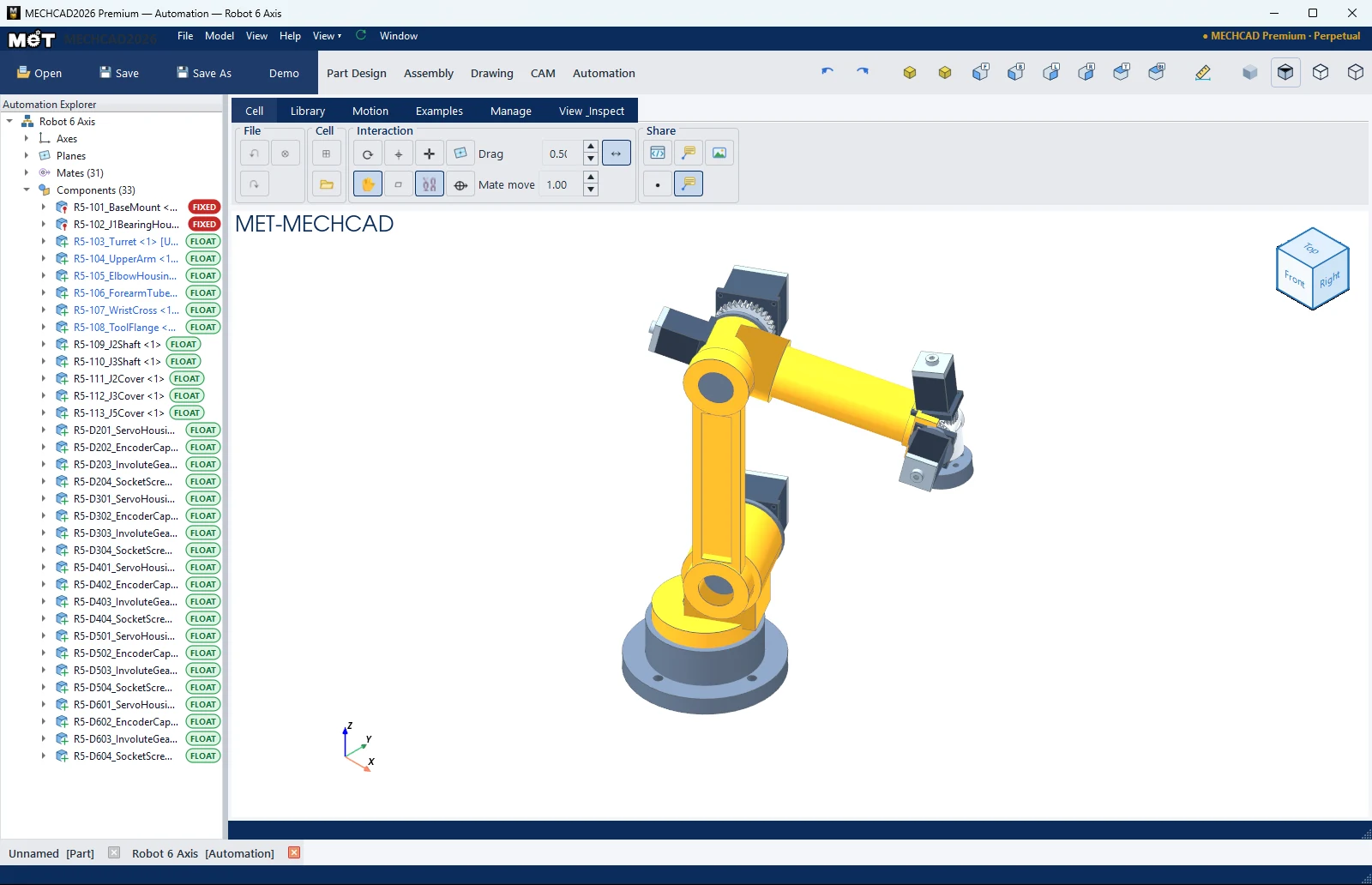
Ribbon



| แท็บ › กลุ่ม | คำสั่ง |
|---|---|
| Cell › File | Undo, Redo, Close (บันทึก/เปิดไฟล์ใช้ Save / Open แถบบนสุด) |
| Cell › Cell | New Cell, Import 3D (ถามบทบาท: Robot / Cobot / Delta / Tool / Equipment / Workpiece) |
| Cell › Interaction | เหมือน Assembly: Regen, Drag Part, Axis Connector, Plane, Axis, Show Mates, Show Datums, Mate Axis, Drag, Mate move, Min Motion |
| Library › Robot | Robot Library, Cobot Library, Delta Library |
| Library › Equipment & Product | Conveyor, Actuator, Box, Bottle, Object |
| Motion › Motion Wizard | Motion Study, Pick/Place Wizard, Teach Pick, Teach Place, Play, Run Loop, Pause, Stop |
| Motion › Animation | Play Motion, Explode, Collapse, ⏹ Stop, ⏺ Record |
| Examples › Demo | Edit Pattern |
| Manage / View & Inspect | Component State, Share (Export HTML/STL, 3D Notes, Picture), View, Inspect (Measure, Interference, Clearance) |

ลำดับงาน
- New Cell
- นำเข้าหุ่นยนต์จาก Robot Library หรือ Import 3D
- เพิ่มสายพาน กล่อง ขวด จาก Equipment & Product
- ใช้ Pick/Place Wizard หรือ Teach Pick / Teach Place (เลือกจุดแล้วกด: Pick taught at X… Y… Z… mm)
- Play หรือ Run Loop (Automation RUN LOOP active - click Stop to finish) แล้ว Stop
หมายเหตุ: Workbench นี้อยู่ใน MECHCAD Expert และ Premium บน Standard แท็บนี้จะแสดงการ์ดแนะนำให้อัปเกรด ดู Edition ของ MECHCAD