
ใช้ทำอะไร
สร้างสำเนาของชิ้นส่วนหรือ Sub-Assembly เป็นแถว (Row) คอลัมน์ (Column) และชั้น (Layer) เช่น ขวดบนพาเลท สกรูหลายตัว
อยู่ที่ไหน
Manage › Assembly Tools › Linear Pattern
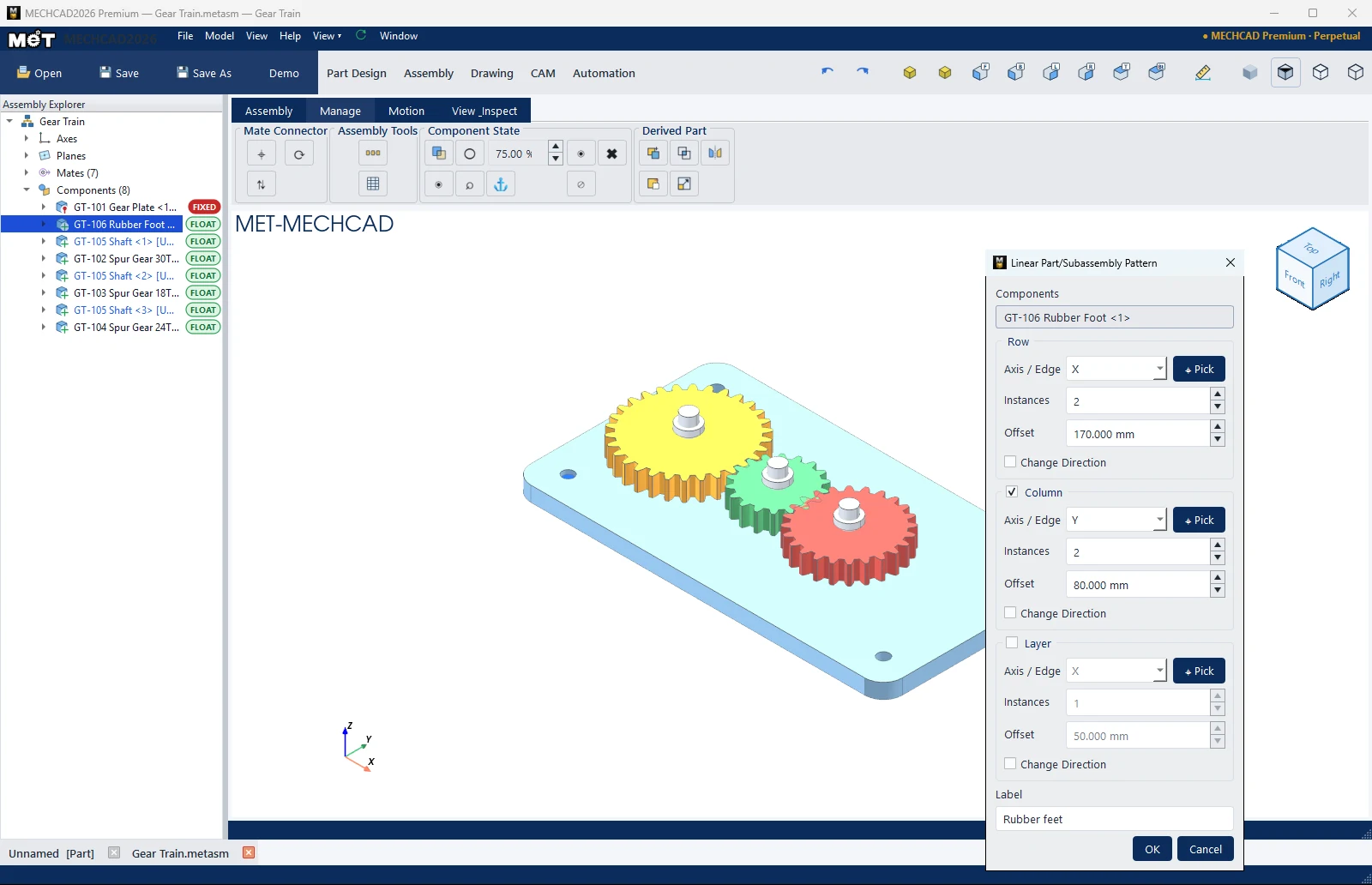
ขั้นตอน
- เลือกชิ้นส่วน แล้วกด Linear Pattern
- ที่ Row เลือก Axis / Edge (X / Y / Z หรือ Picked face… แล้วกด ⌖ Pick) ใส่ Instances และ Offset
- ติ๊ก Column และ/หรือ Layer ถ้าต้องการทิศเพิ่ม
- ตั้ง Label แล้วกด OK
| ตัวเลือก | ค่าเริ่มต้น | ความหมาย |
|---|---|---|
| Components | ชิ้นที่เลือก | ต้นแบบ |
| Axis / Edge | X | ทิศของแต่ละชุด |
| Instances | – | จำนวน (1–500) |
| Offset | 50 mm | ระยะห่าง |
| Change Direction | ปิด | กลับทิศ |
| Label | Linear Pattern (1) | ชื่อ |