
What it does
This table lists all 266 typed commands in MCAD 2026, with their aliases and links to the help pages. In the program, you can open the same table from Help › Command Reference... (F1), or type HELP (?) to list the commands on the Command line.
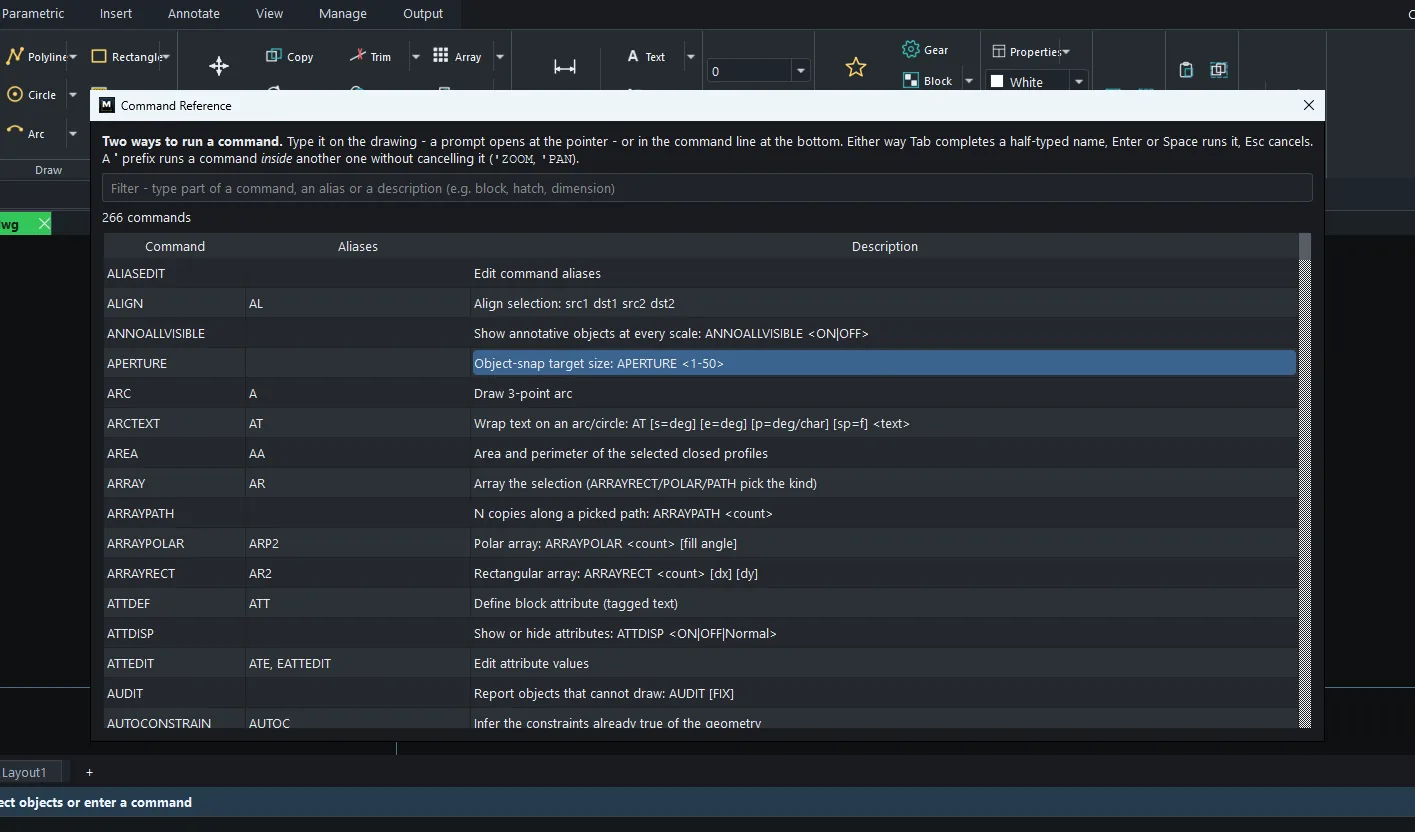
Note: The descriptions in the table are the same text that the program shows in its command suggestions (in English). In the syntax,
<...>= a required value and[...]= an optional value.
Command list
| Command | Alias | Description (from the program) | Help page |
|---|---|---|---|
ALIASEDIT |
– | Edit command aliases | Options, Shortcuts and Aliases (OPTIONS / CUI) |
ALIGN |
AL |
Align selection: src1 dst1 src2 dst2 | ALIGN |
ANNOALLVISIBLE |
– | Show annotative objects at every scale: ANNOALLVISIBLE <ON|OFF> | Annotation Scale (OBJECTSCALE, ANNOALLVISIBLE) |
APERTURE |
– | Object-snap target size: APERTURE <1-50> | Status Bar: Snap, Ortho, Polar, OSnap |
ARC |
A |
Draw 3-point arc | ARC (3-point arc) |
ARCTEXT |
AT |
Wrap text on an arc/circle: AT [s=deg] [e=deg] [p=deg/char] [sp=f] <text> | Text Tools (ARCTEXT, TALIGN, TCOUNT, FIND ...) |
AREA |
AA |
Area and perimeter of the selected closed profiles | Measuring and inquiry (DIST, AREA, LIST) |
ARRAY |
AR |
Array the selection (ARRAYRECT/POLAR/PATH pick the kind) | ARRAY - Rectangular / Polar / Path |
ARRAYPATH |
– | N copies along a picked path: ARRAYPATH <count> | ARRAY - Rectangular / Polar / Path |
ARRAYPOLAR |
ARP2 |
Polar array: ARRAYPOLAR <count> [fill angle] | ARRAY - Rectangular / Polar / Path |
ARRAYRECT |
AR2 |
Rectangular array: ARRAYRECT <count> [dx] [dy] | ARRAY - Rectangular / Polar / Path |
ATTDEF |
ATT |
Define block attribute (tagged text) | Attributes (ATTDEF, ATTEDIT, ATTDISP) |
ATTDISP |
– | Show or hide attributes: ATTDISP <ON|OFF|Normal> | Attributes (ATTDEF, ATTEDIT, ATTDISP) |
ATTEDIT |
ATE, EATTEDIT |
Edit attribute values | Attributes (ATTDEF, ATTEDIT, ATTDISP) |
AUDIT |
– | Report objects that cannot draw: AUDIT [FIX] | AUDIT, RECOVER and PURGE |
AUTOCONSTRAIN |
AUTOC |
Infer the constraints already true of the geometry | Geometric Constraints (Parametric) |
BASE |
– | Insertion base point for this drawing: BASE <x> <y> | Units (UNITS) and System Variables |
BCLOSE |
– | Close Block Editor: BCLOSE SAVE or BCLOSE DISCARD | Block Editor and Dynamic Blocks (BEDIT, BPARAM) |
BEDIT |
BE |
Open a selected/named definition in the isolated Block Editor | Block Editor and Dynamic Blocks (BEDIT, BPARAM) |
BLOCK |
B, BMAKE |
Define a block from the selection: BLOCK <name> [baseX baseY] | BLOCK, INSERT and WBLOCK |
BLOCKLIST |
BL |
List the drawing's blocks and their dynamic parameters | BLOCK, INSERT and WBLOCK |
BOUNDARY |
BO |
Trace a closed polyline around the selected profiles | BOUNDARY, REGION and Booleans (UNION/SUBTRACT/INTERSECT) |
BPARAM |
BPAR |
Add a dynamic parameter to the selected block ('BPARAM' shows the forms) | Block Editor and Dynamic Blocks (BEDIT, BPARAM) |
BREAK |
BR |
Break: 2 points on an entity remove the middle | BREAK, JOIN and PEDIT |
BSAVE |
– | Save the open block definition and update every reference | Block Editor and Dynamic Blocks (BEDIT, BPARAM) |
BSET |
BPROP |
Set a dynamic parameter on the selected block: BSET <param> <value> | Block Editor and Dynamic Blocks (BEDIT, BPARAM) |
CAL |
– | Calculator: CAL 25.4*3, CAL sqrt(2), CAL sin(30) | Command Line, Aliases and Smart Input |
CENTERLINE |
CL |
Centreline between two selected lines | CENTERMARK and CENTERLINE |
CENTERMARK |
DIMCENTER, DCE |
Centre cross on the selected circles/arcs: CENTERMARK [size] | CENTERMARK and CENTERLINE |
CHAMFER |
CHA |
Chamfer corner (CHAMFER [D] <distance>) | FILLET and CHAMFER - Corner rounding and bevelling |
CHPROP |
CHANGE |
Retag the selection: CHPROP layer=NAME color=#RRGGBB | PROPERTIES, MATCHPROP and CHPROP |
CIRCLE |
C |
Draw circle | CIRCLE and DONUT |
COLOR |
COL, DDCOLOR |
Colour for new objects | COLOR, LINETYPE and LWEIGHT |
CONSTRAINTBAR |
CBAR |
List the drawing's constraints | Geometric Constraints (Parametric) |
CONSTRAINTSETTINGS |
CSETTINGS |
Constraint options: CONSTRAINTSETTINGS [INFER ON|OFF] | Geometric Constraints (Parametric) |
COPY |
CO, CP |
Copy selection | MOVE and COPY |
COPYBASE |
– | Copy with base point (paste in any window) | Clipboard: COPYCLIP, CUTCLIP, PASTECLIP, COPYBASE |
COPYCLIP |
CC |
Copy the selection to the clipboard | Clipboard: COPYCLIP, CUTCLIP, PASTECLIP, COPYBASE |
CUI |
– | Shortcut and UI customization | Options, Shortcuts and Aliases (OPTIONS / CUI) |
CUTCLIP |
CX |
Cut the selection to the clipboard | Clipboard: COPYCLIP, CUTCLIP, PASTECLIP, COPYBASE |
DATALINK |
DL |
Table from a spreadsheet: DATALINK <file> [sheet] | UPDATE | DETACH | TABLE and DATALINK - Tables |
DBLIST |
– | Tally every object in the drawing | Measuring and inquiry (DIST, AREA, LIST) |
DCANGULAR |
DCA |
Dimensional constraint: angle between two lines | Dimensional Constraints (DCLINEAR, DCRADIUS ...) |
DCCONVERT |
– | Turn dimensions into dimensional constraints | Dimensional Constraints (DCLINEAR, DCRADIUS ...) |
DCDIAMETER |
DCD |
Dimensional constraint: circle diameter | Dimensional Constraints (DCLINEAR, DCRADIUS ...) |
DCLINEAR |
DCL |
Dimensional constraint: distance between two lines' start points | Dimensional Constraints (DCLINEAR, DCRADIUS ...) |
DCRADIUS |
DCR |
Dimensional constraint: circle radius | Dimensional Constraints (DCLINEAR, DCRADIUS ...) |
DDPTYPE |
PTYPE |
Point display size: DDPTYPE <size> | Units (UNITS) and System Variables |
DELCONSTRAINT |
DELC |
Remove a constraint: DELCONSTRAINT [n|all] | Geometric Constraints (Parametric) |
DIM |
DIMENSION |
Smart dimension | Smart Dimension (DIM) |
DIMALIGNED |
DAL |
Aligned dimension | DIMLINEAR, DIMALIGNED and DIMVERTICAL |
DIMANGULAR |
DAN |
Angular dimension | DIMANGULAR, DIMRADIUS, DIMDIAMETER, DIMARC, DIMJOGGED |
DIMARC |
DAR |
Arc length dimension | DIMANGULAR, DIMRADIUS, DIMDIAMETER, DIMARC, DIMJOGGED |
DIMARROW |
ARCHTICK |
Arrowheads: DIMARROW [arrow|tick] (tick = construction slash) | Editing dimensions (DIMEDIT, DIMTEDIT, DIMBREAK ...) |
DIMBASELINE |
DBA |
Baseline dimension chain (QDIM B) | QDIM, DIMCONTINUE and DIMBASELINE |
DIMBREAK |
– | Gap dimension lines where geometry crosses: DIMBREAK [size|REMOVE] | Editing dimensions (DIMEDIT, DIMTEDIT, DIMBREAK ...) |
DIMCONSTRAINT |
DIMCON |
Apply a dimensional constraint: DIMCONSTRAINT <type> [value] | Dimensional Constraints (DCLINEAR, DCRADIUS ...) |
DIMCONTINUE |
DCO |
Continuous dimension chain (QDIM C) | QDIM, DIMCONTINUE and DIMBASELINE |
DIMDIAMETER |
DDI |
Diameter dimension | DIMANGULAR, DIMRADIUS, DIMDIAMETER, DIMARC, DIMJOGGED |
DIMEDIT |
DED |
Edit dimension text: DIMEDIT <Home|New <text>|Rotate <deg>> | Editing dimensions (DIMEDIT, DIMTEDIT, DIMBREAK ...) |
DIMJOGGED |
DJO, JOG |
Jogged radius dimension: DIMJOGGED [Remove] | DIMANGULAR, DIMRADIUS, DIMDIAMETER, DIMARC, DIMJOGGED |
DIMJOGLINE |
DJL |
Not-to-scale jog on a dimension line: DIMJOGLINE [0-1|REMOVE] | Editing dimensions (DIMEDIT, DIMTEDIT, DIMBREAK ...) |
DIMLINEAR |
DLI |
Linear dimension | DIMLINEAR, DIMALIGNED and DIMVERTICAL |
DIMORDINATE |
DOR |
Ordinate dimension | DIMORDINATE - Ordinate Dimension |
DIMOVERRIDE |
DOV |
Override one dimension setting: DIMOVERRIDE <precision|text> <value> | Editing dimensions (DIMEDIT, DIMTEDIT, DIMBREAK ...) |
DIMPOST |
DP |
Dimension prefix/suffix: DIMPOST %%c<> or DIMPOST <> mm | Editing dimensions (DIMEDIT, DIMTEDIT, DIMBREAK ...) |
DIMRADIUS |
DRA |
Radius dimension | DIMANGULAR, DIMRADIUS, DIMDIAMETER, DIMARC, DIMJOGGED |
DIMREGEN |
– | Re-measure every dimension | Editing dimensions (DIMEDIT, DIMTEDIT, DIMBREAK ...) |
DIMSCALE |
– | Overall dimension feature scale: DIMSCALE <value> | Units (UNITS) and System Variables |
DIMSNAP |
– | Smart Dimension object snap (End/Mid/Center): DIMSNAP [ON|OFF] | Status Bar: Snap, Ortho, Polar, OSnap |
DIMSPACE |
– | Even out parallel dimension offsets: DIMSPACE [spacing] (0 = align) | Editing dimensions (DIMEDIT, DIMTEDIT, DIMBREAK ...) |
DIMSTYLE |
D, DST, DDIM |
Dimension styles | DIMSTYLE and STYLE - Style Manager |
DIMTEDIT |
DIMTED |
Place dimension text: DIMTEDIT <Left|Right|Center|Home|Angle deg> | Editing dimensions (DIMEDIT, DIMTEDIT, DIMBREAK ...) |
DIMVERTICAL |
DVE |
Vertical dimension | DIMLINEAR, DIMALIGNED and DIMVERTICAL |
DIST |
DI |
Distance and angle between two points | Measuring and inquiry (DIST, AREA, LIST) |
DIVIDE |
DIV |
Copy the selection at N equal divisions of a path: DIV <count> | ARRAY - Rectangular / Polar / Path |
DLINE |
DLN |
Dual line: two parallels along one picked path (DLINE [width] [C|E]) | DLINE and MLINE - Parallel lines |
DONUT |
DO |
Two concentric circles: DONUT [inner] [outer] | CIRCLE and DONUT |
DRAWORDER |
DR |
Move the selection in the draw order: DRAWORDER <Front|Back> | DRAWORDER, OVERKILL, REVERSE and FLATTEN |
DSETTINGS |
SE2, DDRMODES |
Drafting settings: snap, grid and object snap | Status Bar: Snap, Ortho, Polar, OSnap |
ELLIPSE |
EL |
Draw ellipse | ELLIPSE |
ERASE |
E, DELETE, DEL |
Erase selection | ERASE, OOPS, UNDO and REDO |
ETRANSMIT |
ZIP |
Package the drawing and its references: ETRANSMIT [file.zip] | ETRANSMIT - Package a drawing for sending |
EXPLODE |
X |
Break blocks, tables, multileaders and splines into primitives | EXPLODE and XPLODE |
EXPORT |
EXP, DXFOUT |
Export the drawing to another format | EXPORT - Exporting files |
EXTEND |
EX |
Extend | TRIM, EXTEND and EXTRIM |
EXTRIM |
– | Trim everything at a selected boundary: EXTRIM [Outside] | TRIM, EXTEND and EXTRIM |
FIELD |
– | Self-updating text: FIELD <expression> ('FIELD ?' lists them) | FIELD and UPDATEFIELD |
FILLET |
F |
Fillet corner (FILLET [R] <radius>) | FILLET and CHAMFER - Corner rounding and bevelling |
FILTER |
FI |
Select by property: FILTER <prop>=<value> ... ('FILTER ?' lists them) | Selecting Objects (SELECT, QSELECT, FILTER) |
FIND |
– | Search drawing text: FIND <text> [replacement] | Text Tools (ARCTEXT, TALIGN, TCOUNT, FIND ...) |
FLATTEN |
– | Drop every Z to zero | DRAWORDER, OVERKILL, REVERSE and FLATTEN |
GCCOINCIDENT |
GCC |
Make two objects' start points coincide | Geometric Constraints (Parametric) |
GCCOLLINEAR |
GCCOL |
Constrain two lines onto the same infinite line | Geometric Constraints (Parametric) |
GCCONCENTRIC |
GCCO |
Constrain two circles concentric | Geometric Constraints (Parametric) |
GCEQUAL |
GCE |
Equal length (lines) or equal radius (circles) | Geometric Constraints (Parametric) |
GCFIX |
GCF, FIXCONSTRAINT |
Fix the selected line or circle in place | Geometric Constraints (Parametric) |
GCHORIZONTAL |
GCH |
Constrain the selected line horizontal | Geometric Constraints (Parametric) |
GCODE |
CAM, NCOUT |
Generate CNC, laser or plotter G-code from 2D drawing geometry | GCODE - Generate G-code for CNC and laser |
GCPARALLEL |
GCPA |
Constrain two lines parallel | Geometric Constraints (Parametric) |
GCPERPENDICULAR |
GCPE |
Constrain two lines perpendicular | Geometric Constraints (Parametric) |
GCSMOOTH |
GCSM |
Smooth continuity for a line-circle or circle-circle pair | Geometric Constraints (Parametric) |
GCSYMMETRIC |
GCSYM |
Constrain two matching objects about a selected line axis | Geometric Constraints (Parametric) |
GCTANGENT |
GCT |
Constrain two objects tangent | Geometric Constraints (Parametric) |
GCVERTICAL |
GCV |
Constrain the selected line vertical | Geometric Constraints (Parametric) |
GEOMCONSTRAINT |
GEOMCON |
Apply a geometric constraint: GEOMCONSTRAINT <type> | Geometric Constraints (Parametric) |
GETVAR |
GET |
Read a system variable: GETVAR <name> | Units (UNITS) and System Variables |
GRADIENT |
GD |
Gradient fill: GRADIENT [#RRGGBB] [#RRGGBB] [angle] | HATCH and GRADIENT |
GROUP |
G |
Bind the selection into a group | GROUP, UNGROUP and GROUPEDIT |
GROUPEDIT |
GROUPED |
Change a group's members: GROUPEDIT <Add|Remove> | GROUP, UNGROUP and GROUPEDIT |
HATCH |
H, BH, H2, BHATCH |
Fill closed profiles: HATCH [pattern] [scale] [angle] ('HATCH ?' lists) | HATCH and GRADIENT |
HATCHEDIT |
HE |
Restyle selected hatches: HATCHEDIT <pattern> [scale] [angle] | HATCH and GRADIENT |
HATCHTOBACK |
HTB |
Send every hatch behind the linework | HATCH and GRADIENT |
HELP |
? |
List commands | Command Index |
HIDEOBJECTS |
HIDEOBJ |
Hide the selection (UNISOLATEOBJECTS restores it) | Selecting Objects (SELECT, QSELECT, FILTER) |
ID |
– | Report the coordinates of a point | Measuring and inquiry (DIST, AREA, LIST) |
IMAGE |
IM, IMAGEATTACH |
Raster underlay: IMAGE <Attach file|List|Detach> | Images and PDF Underlays (IMAGE, PDFATTACH) |
INSERT |
I |
Place a block: INSERT <name> [x y] [scale] [rot] (no name: Symbols panel) | BLOCK, INSERT and WBLOCK |
INSERTOBJ |
IMAGEATT |
Insert a picture from a file | Images and PDF Underlays (IMAGE, PDFATTACH) |
INTERSECT |
IN |
Keep only the overlapping area | BOUNDARY, REGION and Booleans (UNION/SUBTRACT/INTERSECT) |
ISOLATEOBJECTS |
ISOLATE |
Hide everything except the selection | Selecting Objects (SELECT, QSELECT, FILTER) |
ISOPLANE |
ISO |
Isometric drafting: ISOPLANE <Left|Top|Right|OFF> | Status Bar: Snap, Ortho, Polar, OSnap |
JOIN |
J |
Join collinear/touching lines & polylines | BREAK, JOIN and PEDIT |
JUSTIFYTEXT |
JT |
Re-justify selected text in place: JUSTIFYTEXT <Left|Center|Right> | Text Tools (ARCTEXT, TALIGN, TCOUNT, FIND ...) |
LANDXMLIMPORT |
LANDXML |
Import LandXML points, surface faces and alignments | Import DXF, PDF, Point Cloud and LandXML |
LAYER |
LA |
Layer manager | LAYER - Layer Manager |
LAYERSTATE |
LAS, LMAN |
Named layer setups: LAYERSTATE <Save|Restore|List|Delete> [name] | LAYER - Layer Manager |
LAYFRZ |
– | Freeze a layer (LAYON will not bring it back) | Layer tools (LAYISO, LAYOFF, LAYFRZ, LAYLCK ...) |
LAYISO |
LI2 |
Isolate the selected object's layer | Layer tools (LAYISO, LAYOFF, LAYFRZ, LAYLCK ...) |
LAYLCK |
– | Lock a layer: visible but not selectable | Layer tools (LAYISO, LAYOFF, LAYFRZ, LAYLCK ...) |
LAYMCUR |
LAYCUR |
Make the selected object's layer current | Layer tools (LAYISO, LAYOFF, LAYFRZ, LAYLCK ...) |
LAYOFF |
– | Hide the selected object's layer | Layer tools (LAYISO, LAYOFF, LAYFRZ, LAYLCK ...) |
LAYON |
– | Show every layer | Layer tools (LAYISO, LAYOFF, LAYFRZ, LAYLCK ...) |
LAYOUT |
LO |
Sheets: LAYOUT <New|Rename|Delete|List> [name] | Layouts and viewports (LAYOUT, MVIEW, PAGESETUP) |
LAYTHW |
– | Thaw a frozen layer, or all of them | Layer tools (LAYISO, LAYOFF, LAYFRZ, LAYLCK ...) |
LAYULK |
– | Unlock a locked layer, or all of them | Layer tools (LAYISO, LAYOFF, LAYFRZ, LAYLCK ...) |
LAYUNISO |
– | Undo LAYISO | Layer tools (LAYISO, LAYOFF, LAYFRZ, LAYLCK ...) |
LEADER |
LEAD |
Arrow with a note | QLEADER, LEADER, MLEADER and Callout |
LENGTHEN |
LEN |
Extend a line end by delta: LEN [delta] | STRETCH and LENGTHEN |
LIMITS |
– | Nominal sheet area: LIMITS <x1> <y1> <x2> <y2> | OFF | Units (UNITS) and System Variables |
LINE |
L |
Draw line | LINE |
LINETYPE |
LT, DDLTYPE |
Linetype for new objects | COLOR, LINETYPE and LWEIGHT |
LIST |
LI |
List selection info | Measuring and inquiry (DIST, AREA, LIST) |
LTSCALE |
LTS |
Global linetype scale: LTSCALE <value> | Units (UNITS) and System Variables |
LWEIGHT |
LINEWEIGHT |
Lineweight for new objects | COLOR, LINETYPE and LWEIGHT |
M2P |
MTP |
Snap to the midpoint between two points (can be used transparently) | Command Line, Aliases and Smart Input |
MATCHPROP |
MA |
Match properties (source, then targets) | PROPERTIES, MATCHPROP and CHPROP |
MEASURE |
ME |
Copy selection along a path: ME <spacing> | ARRAY - Rectangular / Polar / Path |
MEASUREGEOM |
MEA |
Measure: MEASUREGEOM <Distance|Angle|Area|Radius> | Measuring and inquiry (DIST, AREA, LIST) |
MIRROR |
MI |
Mirror | MIRROR |
MLEADER |
MLD |
Multileader: arrow, elbow and note in three picks | QLEADER, LEADER, MLEADER and Callout |
MLINE |
ML |
Parallel runs in one pass: MLINE <lines> <offset> [Zero|Top|Bottom] | DLINE and MLINE - Parallel lines |
MOVE |
M |
Move (snap) | MOVE and COPY |
MSPACE |
MS |
Switch to model space | Layouts and viewports (LAYOUT, MVIEW, PAGESETUP) |
MTEXT |
T, MT |
Multi-line text | TEXT, MTEXT and TEXTEDIT |
MVIEW |
MV |
Add a viewport: MVIEW [width] [height] | Layouts and viewports (LAYOUT, MVIEW, PAGESETUP) |
NEST |
NESTING, SHEETNEST |
Nest closed parts on sheets for laser / plasma / wire-cut output | NEST - Arrange Parts on a Sheet |
NEW |
QNEW |
New drawing | NEW, SAVE and SAVEAS - Save DWG/DXF |
OBJECTSCALE |
ANNOOBJECTSCALE |
Annotative scales: OBJECTSCALE <Add|Delete|List> [scale] | Annotation Scale (OBJECTSCALE, ANNOALLVISIBLE) |
OFFSET |
O |
Offset selection: O [distance] | OFFSET - Parallel Copies |
OOPS |
– | Bring back the last erased objects (not UNDO) | ERASE, OOPS, UNDO and REDO |
OPEN |
– | Open... | Open DWG/DXF Files and the Start Center |
OPTIONS |
OP |
Application options and customization | Options, Shortcuts and Aliases (OPTIONS / CUI) |
ORTHO |
– | Right-angle drawing: ORTHO <ON|OFF> (F8) | Status Bar: Snap, Ortho, Polar, OSnap |
OSMODE |
– | Running object-snap bitmask: OSMODE <value> | Status Bar: Snap, Ortho, Polar, OSnap |
OSNAP |
OS, DDOSNAP |
Running object snap: OSNAP <ON|OFF> | Status Bar: Snap, Ortho, Polar, OSnap |
OVERKILL |
OV |
Delete duplicate/overlapping geometry | DRAWORDER, OVERKILL, REVERSE and FLATTEN |
PAGESETUP |
PAGE |
Sheet size for a layout: PAGESETUP <A3|420x297> [Portrait|Landscape] [margin] | Layouts and viewports (LAYOUT, MVIEW, PAGESETUP) |
PAN |
P |
Pan view (can be used transparently) | Zoom, Pan and View Controls |
PASTECLIP |
PASTE, PA |
Paste from clipboard | Clipboard: COPYCLIP, CUTCLIP, PASTECLIP, COPYBASE |
PDFADJUST |
– | Fade a selected PDF underlay: PDFADJUST <0..100> | Images and PDF Underlays (IMAGE, PDFATTACH) |
PDFATTACH |
PDFUNDERLAY |
Attach a PDF underlay: PDFATTACH <file> [page] | Images and PDF Underlays (IMAGE, PDFATTACH) |
PDFCLIP |
– | Clip a selected PDF underlay to a closed profile | Images and PDF Underlays (IMAGE, PDFATTACH) |
PDFIMPORT |
PDFIN |
Import a vector PDF's geometry: PDFIMPORT <file> [page] | Import DXF, PDF, Point Cloud and LandXML |
PEDIT |
PE |
Join selected chain into polyline | BREAK, JOIN and PEDIT |
PICKBOX |
PICKBOXSIZE |
Selection pickbox half-size in pixels: PICKBOX <1-50> | Status Bar: Snap, Ortho, Polar, OSnap |
PLINE |
PL, POLYLINE |
Draw polyline | PLINE - Polyline |
PLOT |
PRINT |
Print the drawing | PLOT and PREVIEW - Print and PDF |
POINT |
PO |
Place a point object | POINT |
POINTCLOUDATTACH |
POINTCLOUD, PCATTACH |
Import XYZ/PTS/CSV point cloud: POINTCLOUDATTACH <file> [max_points] | Import DXF, PDF, Point Cloud and LandXML |
POLAR |
– | Polar tracking: POLAR <ON|OFF> (F10) | Status Bar: Snap, Ortho, Polar, OSnap |
POLYGON |
POL |
Draw polygon | POLYGON - Regular Polygon |
PREVIEW |
PRE |
Print preview | PLOT and PREVIEW - Print and PDF |
PROPERTIES |
CH, MO, PR, DDMODIFY |
What the selection is, and where to change it | PROPERTIES, MATCHPROP and CHPROP |
PSPACE |
PS |
Switch to paper space | Layouts and viewports (LAYOUT, MVIEW, PAGESETUP) |
PUBLISH |
PUB |
Batch all layouts to one PDF | PUBLISH - Combine All Layouts into One PDF |
PURGE |
PU |
Remove unused layers/styles | AUDIT, RECOVER and PURGE |
QDIM |
– | Quick dimension chain across selected geometry | QDIM, DIMCONTINUE and DIMBASELINE |
QLEADER |
LE |
Leader | QLEADER, LEADER, MLEADER and Callout |
QPMODE |
QUICKPROPERTIES, QP |
Quick Properties box at the cursor: QPMODE <ON|OFF> (Ctrl+Shift+P) | Workspaces, Palettes and Clean Screen |
QSELECT |
QSE |
Select by kind: QSELECT <kind> [layer] ('QSELECT ?' lists kinds) | Selecting Objects (SELECT, QSELECT, FILTER) |
QTEXT |
– | Draw text as boxes for speed: QTEXT <ON|OFF> | Units (UNITS) and System Variables |
RAY |
– | Construction line from a point, one direction only | XLINE and RAY - Construction Lines |
RECOVER |
– | Open a damaged drawing: RECOVER <file> | AUDIT, RECOVER and PURGE |
RECTANG |
REC, RECTANGLE |
Draw rectangle | RECTANG - Rectangle |
REDO |
– | Redo | ERASE, OOPS, UNDO and REDO |
REGEN |
RE, REGENALL, REDRAW, REDRAWALL |
Rebuild the display from the model | Zoom, Pan and View Controls |
REGION |
REG |
Turn closed profiles into a region (inner rings become holes) | BOUNDARY, REGION and Booleans (UNION/SUBTRACT/INTERSECT) |
RENAME |
REN |
Rename a layer: RENAME <old> <new> | LAYER - Layer Manager |
REVCLOUD |
RC |
Revision cloud around the selection: REVCLOUD [arc length] | SOLID, WIPEOUT and REVCLOUD |
REVERSE |
REV |
Flip the direction of selected lines/polylines | DRAWORDER, OVERKILL, REVERSE and FLATTEN |
ROTATE |
RO |
Rotate selection | ROTATE |
SAVE |
QSAVE |
Save | NEW, SAVE and SAVEAS - Save DWG/DXF |
SAVEAS |
– | Save the drawing under a new name | NEW, SAVE and SAVEAS - Save DWG/DXF |
SAVEPROJECT |
SP, PROJ |
Save all open tabs as an .mprj project | SAVEPROJECT - Save Multiple Tabs as a Project (.mprj) |
SCALE |
SC |
Scale selection: SC [factor] | SCALE and SCALEREF - Resize Objects |
SCALEREF |
SR |
Scale by reference: SCALEREF [measured] [real] | SCALE and SCALEREF - Resize Objects |
SCRIPT |
SCR, MACRO |
Run Python macro (mcad API): SCRIPT [path.py] | SCRIPT - Python Macro API |
SELECT |
SE |
Select tool | Selecting Objects (SELECT, QSELECT, FILTER) |
SELECTLAST |
SELL |
Select the most recently created visible object | Selecting Objects (SELECT, QSELECT, FILTER) |
SELECTPREVIOUS |
SELP |
Restore the previous selection set (AutoCAD P selection keyword) | Selecting Objects (SELECT, QSELECT, FILTER) |
SELECTSIMILAR |
SELSIM |
Select every object of the same kind and layer | Selecting Objects (SELECT, QSELECT, FILTER) |
SETVAR |
SET |
Set a system variable: SETVAR <name> <value> ('SETVAR ?' lists them) | Units (UNITS) and System Variables |
SHEETSET |
SSM, SHEETSETMANAGER |
Multi-drawing sheet sets: SHEETSET <New|Add|List|Remove|Save|Open|Publish> | SHEETSET - Sheet Set Manager |
SKETCH |
– | Freehand: SKETCH [increment], drag to trace | SPLINE, SPLINEDIT and SKETCH |
SLOT |
– | Straight slot | SLOT (Straight Slot) |
SNAP |
SN |
Grid snap: SNAP <spacing|ON|OFF> | Status Bar: Snap, Ortho, Polar, OSnap |
SOLID |
SO |
Filled triangle or quadrilateral | SOLID, WIPEOUT and REVCLOUD |
SPELL |
SP2 |
Check text for common drafting misspellings, repeats and brackets | Text Tools (ARCTEXT, TALIGN, TCOUNT, FIND ...) |
SPLINE |
SPL |
Smooth curve through the points you click | SPLINE, SPLINEDIT and SKETCH |
SPLINEDIT |
SPE |
Edit a spline: SPLINEDIT <Close|Open|Delete n|Add n x y> | SPLINE, SPLINEDIT and SKETCH |
STATUS |
– | Summarise what is in the drawing | Measuring and inquiry (DIST, AREA, LIST) |
STRETCH |
S |
Stretch (crossing box + base + dest) | STRETCH and LENGTHEN |
STYLE |
ST |
Text styles | DIMSTYLE and STYLE - Style Manager |
SUBTRACT |
SU |
First profile minus the rest | BOUNDARY, REGION and Booleans (UNION/SUBTRACT/INTERSECT) |
TABLE |
TB2 |
Place a table: TABLE <rows> <cols> [colw] [rowh] | TABLE CSV <path> | TABLE and DATALINK - Tables |
TABLECELL |
TCELL |
Write into the selected table: TABLECELL <row> <col> <text> | TABLE and DATALINK - Tables |
TABLEDIT |
TED |
Edit a cell of the selected table: TABLEDIT <row> <col> <text> | TABLE and DATALINK - Tables |
TABLEEXPORT |
TBEXP |
Write the selected table out as CSV | TABLE and DATALINK - Tables |
TALIGN |
TA, ALIGNTEXT |
Align selected text onto a line (rotate + drop on) | Text Tools (ARCTEXT, TALIGN, TCOUNT, FIND ...) |
TCOUNT |
TC |
Auto-number selected text: TCOUNT [start] [step] [p=pre] [s=suf] | Text Tools (ARCTEXT, TALIGN, TCOUNT, FIND ...) |
TEXT |
DT, DTEXT |
Single-line text | TEXT, MTEXT and TEXTEDIT |
TEXTALIGN |
– | AutoCAD's name for TALIGN - align text onto a line | Text Tools (ARCTEXT, TALIGN, TCOUNT, FIND ...) |
TEXTEDIT |
ED, DDEDIT, MTEDIT |
Edit the selected text: TEXTEDIT [new text] | TEXT, MTEXT and TEXTEDIT |
TEXTSIZE |
– | Default height for new text: TEXTSIZE <value> | Units (UNITS) and System Variables |
TEXTTOFRONT |
TTF |
Lift annotation above the geometry: TEXTTOFRONT [Text|Dim|Both] | Text Tools (ARCTEXT, TALIGN, TCOUNT, FIND ...) |
TIME |
– | Drawing session time and edit count | Measuring and inquiry (DIST, AREA, LIST) |
TITLEBLOCK |
TB |
Insert title block on the layout sheet | TITLEBLOCK and MET Drawing Sheet |
TOLERANCE |
TOL |
GD&T frame: TOLERANCE <symbol> <value> [datum] ('TOLERANCE ?' lists) | TOLERANCE - GD&T Feature Control Frame |
TRIM |
TR |
Trim | TRIM, EXTEND and EXTRIM |
UCS |
– | User coordinate system: UCS <World|Origin x,y|Z angle|Previous|?> | Zoom, Pan and View Controls |
UCSICON |
– | The UCS axis marker: UCSICON <ON|OFF|ORIGIN|NOORIGIN> | Zoom, Pan and View Controls |
UNDO |
U |
Undo | ERASE, OOPS, UNDO and REDO |
UNGROUP |
UNG |
Break the selected group apart | GROUP, UNGROUP and GROUPEDIT |
UNION |
UNI |
Merge selected profiles into one outline | BOUNDARY, REGION and Booleans (UNION/SUBTRACT/INTERSECT) |
UNISOLATEOBJECTS |
UNISOLATE |
Bring back what ISOLATEOBJECTS hid | Selecting Objects (SELECT, QSELECT, FILTER) |
UNITS |
UN, DDUNITS |
Report the drawing's unit settings | Units (UNITS) and System Variables |
UPDATEFIELD |
UPDATEF |
Re-evaluate every field in the drawing | FIELD and UPDATEFIELD |
VIEW |
V |
Named views: VIEW <Save|Restore|List|Delete> [name] | Zoom, Pan and View Controls |
VIEWCUBE |
NAVVCUBE |
2D orientation cube: VIEWCUBE <ON|OFF|RESET> | Zoom, Pan and View Controls |
VIEWLOCK |
VL |
Lock the view centre - only PAN/ZOOM may move it (can be used transparently) | Zoom, Pan and View Controls |
VPCLIP |
– | Clip a viewport to the selected profile: VPCLIP [Delete] [viewport] | Layouts and viewports (LAYOUT, MVIEW, PAGESETUP) |
VPLAYER |
– | Per-viewport layers: VPLAYER <Freeze|Thaw|List> <layer> [viewport] | Layouts and viewports (LAYOUT, MVIEW, PAGESETUP) |
WBLOCK |
W |
Write selection to DXF | BLOCK, INSERT and WBLOCK |
WIPEOUT |
WO |
Mask that hides whatever is under it | SOLID, WIPEOUT and REVCLOUD |
WIRING |
WW |
Wiring Wizard: TIA IO tags -> A4 wiring pages | Wiring Wizard (WIRING) - PLC IO as A4 Pages |
WSCURRENT |
WORKSPACE |
Current workspace: WSCURRENT [name] | Workspaces, Palettes and Clean Screen |
WSDELETE |
– | Forget a workspace: WSDELETE <name> | Workspaces, Palettes and Clean Screen |
WSSAVE |
– | Save the arrangement: WSSAVE <name> | Workspaces, Palettes and Clean Screen |
XATTACH |
XA |
Attach external DWG/DXF underlay | External Reference (XREF, XATTACH, XCLIP, XBIND) |
XBIND |
XB |
Copy an xref's geometry into this drawing: XBIND [index] | External Reference (XREF, XATTACH, XCLIP, XBIND) |
XCLIP |
XC |
Show only part of an xref: XCLIP [Delete] [index] | External Reference (XREF, XATTACH, XCLIP, XBIND) |
XLINE |
XL |
Infinite construction line | XLINE and RAY - Construction Lines |
XPLODE |
XP |
Explode with control: XPLODE [Layer <name>|Color <#RRGGBB>] | EXPLODE and XPLODE |
XREF |
XR |
External references manager | External Reference (XREF, XATTACH, XCLIP, XBIND) |
ZOOM |
Z, ZE, ZA, ZW |
Zoom (E/A/W/I/O) (can be used transparently) | Zoom, Pan and View Controls |
Try it: Find the commands for a bookshelf elevation
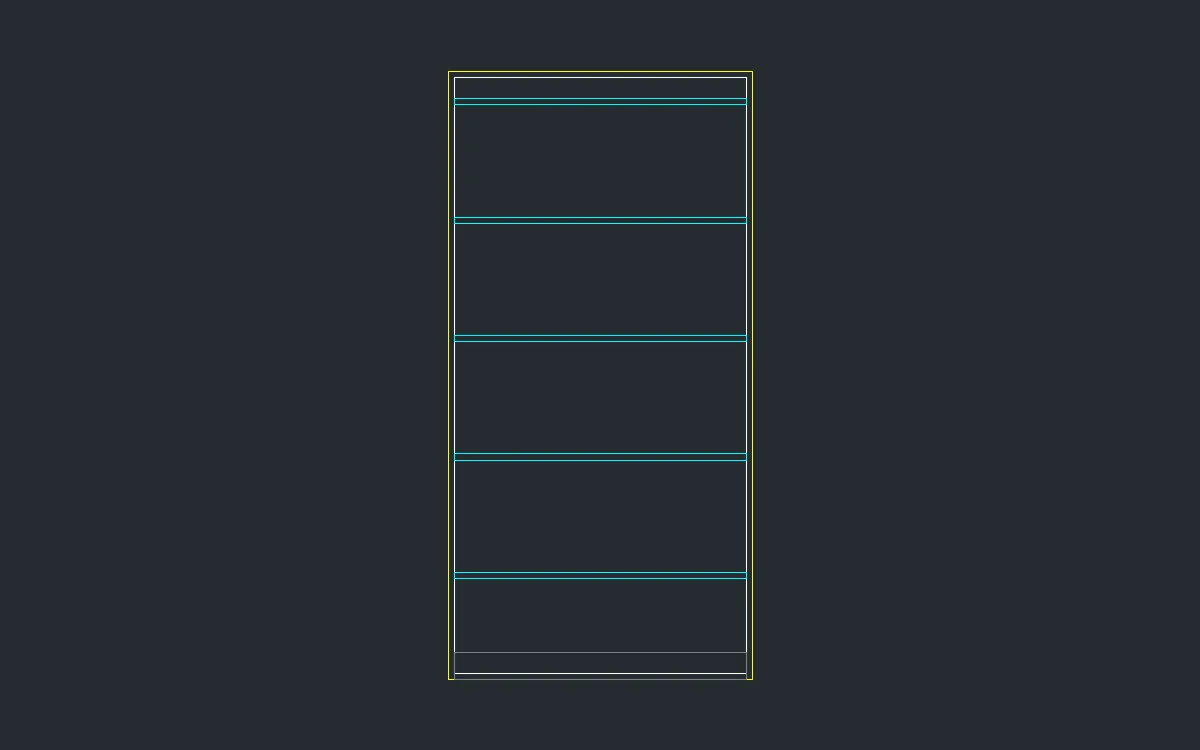
You want a 1.8 m bookshelf with 5 evenly spaced shelves, but you cannot remember the name of the repeat-in-a-row command. Look it up in the Command Reference.
- Press
F1to open the Command Reference and typearrayin the Filter box. Only the ARRAY commands remain, with their syntax, for exampleARRAYRECT <count> [dx] [dy]. - Carcass:
REC0,0, then900Tab1800, and the insideREC18,18, then864Tab1764(18 mm boards). - First shelf:
REC18,300, then864Tab18. - Select the shelf and type
ARRAYRECT 5 0 350. You get 5 shelves 350 mm apart. - Kick plate:
REC18,0, then864Tab80.
Challenge: Type hatch in the Filter box and work out how to give the kick plate a LINE pattern so it reads as timber.