
What it does
Exports a 2D drawing as a DXF file (R2018) for other CAD/CAM programs.
Where to find it
- Ribbon: Output › Interchange › Export (Export DXF)
- Menu: File › Export DXF...
- Command line:
EXPORT(aliasesEXP,DXFOUT)

Steps
- Click Output › Interchange › Export.
- Name the
.dxffile and click Save.
Note: In this 2D edition, the typed commands
EXPORTandDXFOUTare for exporting 3D (STEP/IGES/STL) and reportNo 3D shape to export.Use the Export button on the Ribbon, orSAVEASwith the DXF type, instead. Special objects (Table, Multileader, Tolerance) are exploded into lines and text in the DXF.
Exporting other formats
| To get | Use |
|---|---|
| DWG | SAVEAS |
| PLOT, PUBLISH | |
| G-code | GCODE |
| Separate DXF sheets after nesting | NEST |
| CSV of a table | TABLEEXPORT, see TABLE |
| ZIP for sending | ETRANSMIT |
Try it: Cable-entry gasket for the waterjet shop
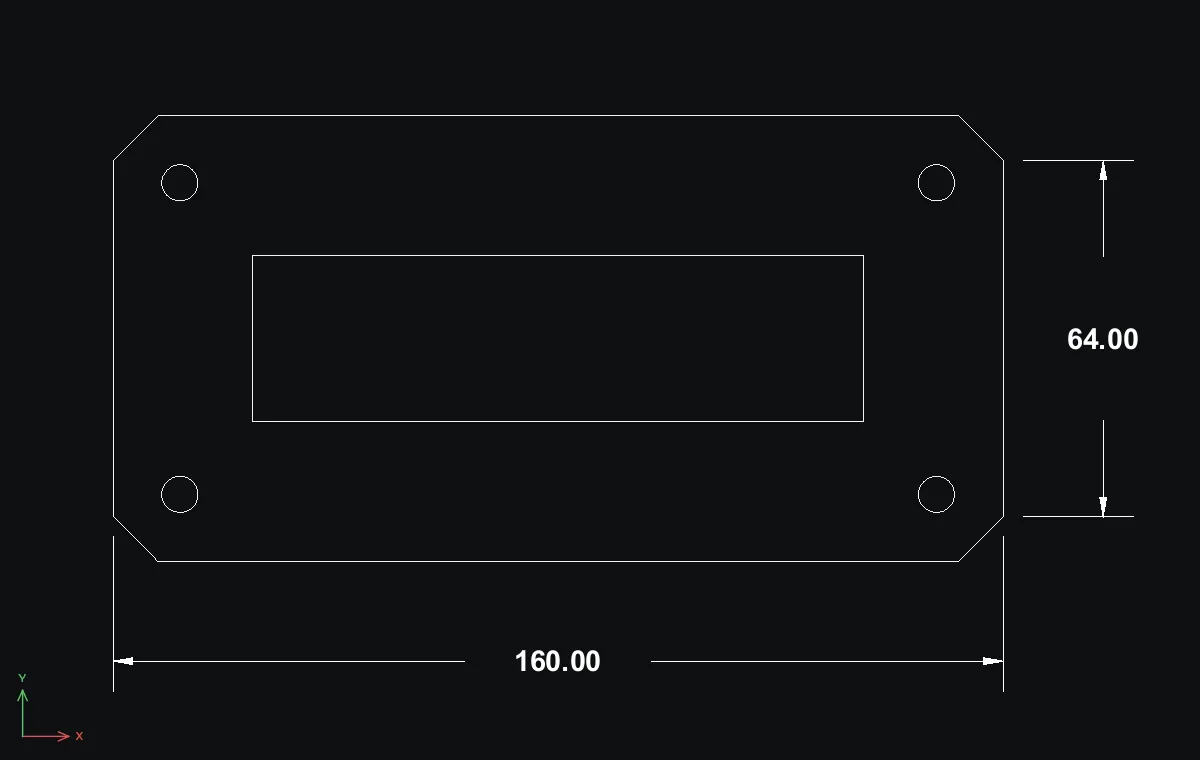
A 160 x 80 rubber gasket that seals a cable-entry cut-out in an enclosure wall. The waterjet shop asks for a DXF, so you draw it and export it in under three minutes.
- Outline with chamfered corners: Polyline - Closed Loop through
8,0152,0160,8160,72152,808,800,720,8, then Enter. - Cable opening:
REC25,25→110Tab30. Bolt holes:Cradius3.25at12,12,148,12,12,68and148,68. - Output › Interchange › Export, name the file
cable_entry_gasket.dxfand click Save. - Open the DXF to check it: the same six closed shapes come back in millimetres, ready for the cutter. Add a
DLIof 160 and aDVEof 64 between the corner flats if the shop wants a check size.
Challenge: Send the same gasket to an AutoCAD user as DWG with SAVEAS.