
What it does
Ready-made jobs with the workpiece, tools and all operations, ready to Simulate. They are good for learning.
Where to find it
Model › Learn › Mill Demo / Lathe Demo, or the Demo button on the top bar while you are on the CAM tab
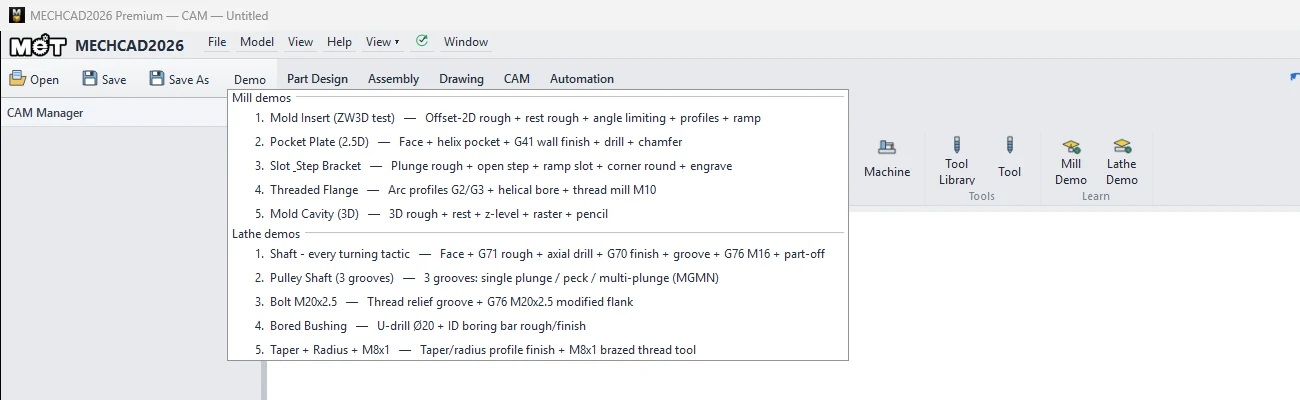
| Mill demos | What you learn |
|---|---|
| 1. Mold Insert | Offset-2D rough, Rest rough, Angle limiting, Profile, Ramp |
| 2. Pocket Plate (2.5D) | Face, helical-entry Pocket, G41 wall finishing, Drill, Chamfer |
| 3. Slot & Step Bracket | Plunge rough, Open step, Ramp slot, Corner round, Engrave |
| 4. Threaded Flange | G2/G3 curved Profile, Helical bore, M10 Thread mill |
| 5. Mold Cavity (3D) | 3D rough, Rest, Z-level, Raster, Pencil |
| Lathe demos | What you learn |
|---|---|
| 1. Shaft - every turning tactic | Face, G71 rough, Axial drill, G70 finish, Groove, G76 M16, Part-off |
| 2. Pulley Shaft (3 grooves) | Single-pass / peck / multi-pass grooves |
| 3. Bolt M20x2.5 | Thread relief groove, G76 M20x2.5 modified flank |
| 4. Bored Bushing | U-drill Ø20, ID boring rough/finish |
| 5. Taper + Radius + M8x1 | Taper/curved profile, brazed threading tool |
Note: The demo jobs are read-only. Use Save CAM As to save one as your own job (you cannot save into the demo folder).
Try it: Make the Threaded Flange demo your own
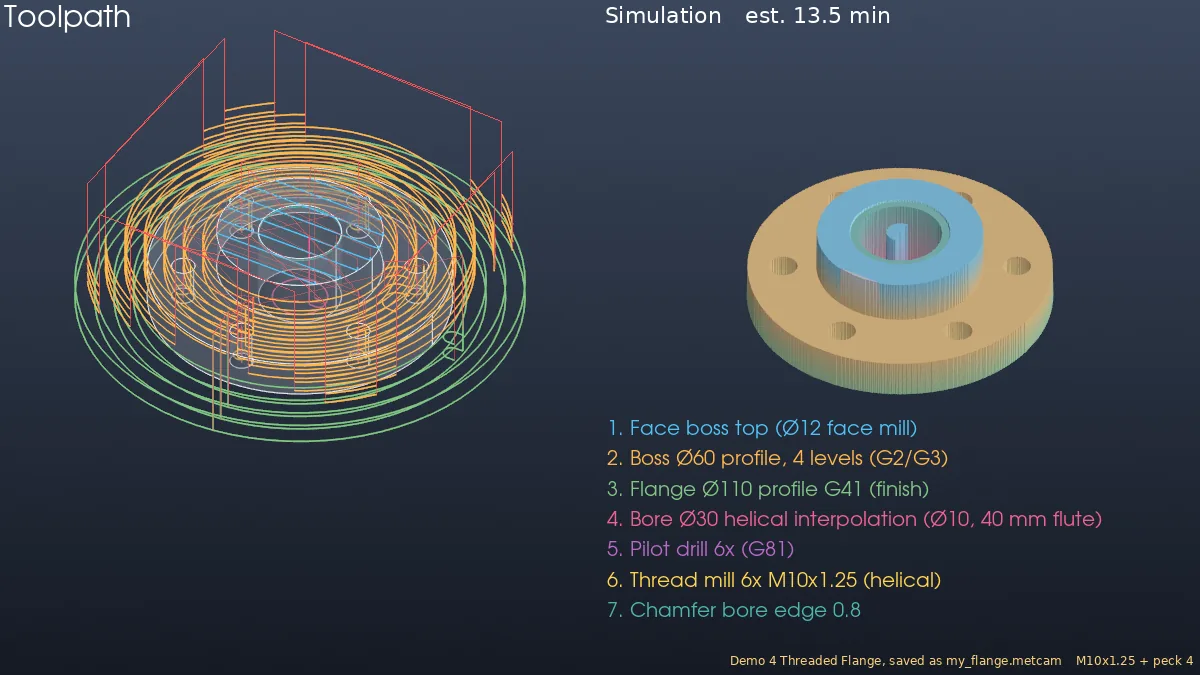
Demo 4 is a Ø110 flange with a boss, a Ø30 bore and six M10 holes on a bolt circle, with seven ready operations. You turn it into your own job and change the threads to a fine pitch.
- On the CAM tab, click Model › Learn › Mill Demo › 4. Threaded Flange. The badge shows Demo (read-only) - use Save As.
- Click Simulate to see all seven operations. The estimated time is about 13.2 min.
- Click Output › Save CAM As and save
my_flange.metcamin your own folder. - Click Thread mill 6x M10x1.5 (helical). Set Thread pitch to 1.25 and rename it
Thread mill 6x M10x1.25. - Click Pilot drill 6x (G81) and set Peck depth to 4.
- Simulate again. The estimated time is now about 13.5 min, because the pecking and the finer pitch add about 20 s.
Challenge: Open Lathe Demo › 3. Bolt M20x2.5, save it as your own job, change Thread size to M20x1.5 and compare the G76 lines in the G-code.
Note: CAM is available only in MECHCAD Premium (and during the trial).