
What it does
Lists every mate in the MECHCAD Mate button, with what it locks and the surfaces you must select.
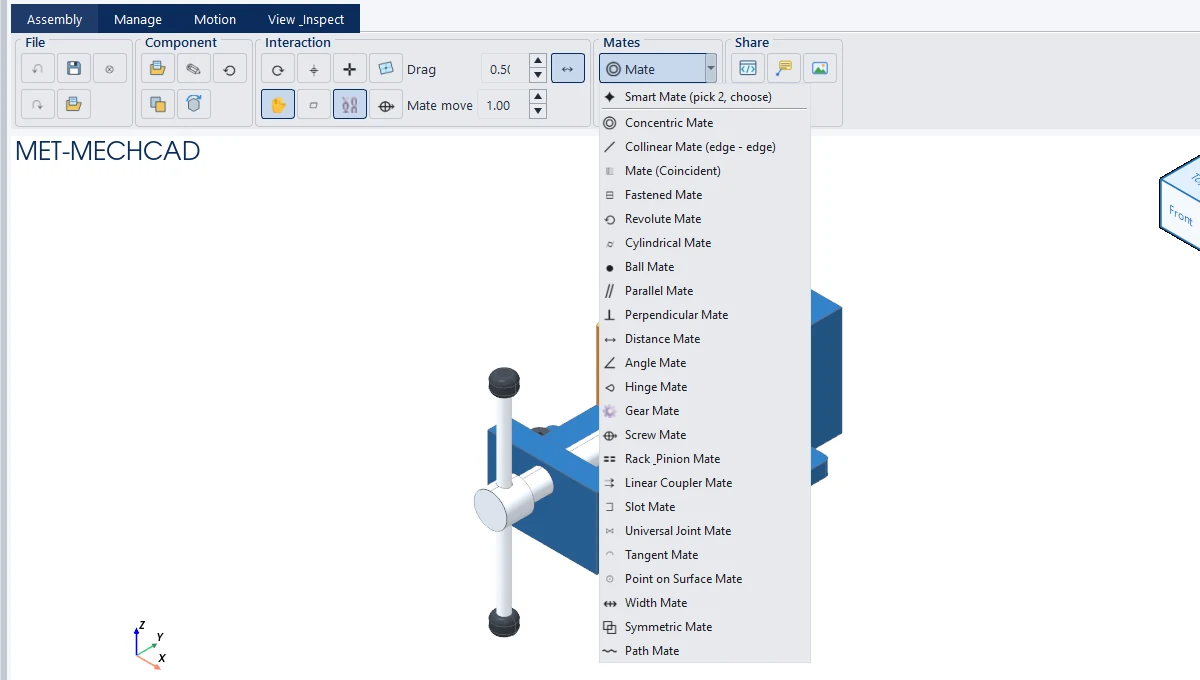
| Mate | What it locks | What to select | Remaining freedom |
|---|---|---|---|
| Smart Mate | Picks the type for you from the surfaces | 2 items | – |
| Concentric | Axes are straight and share one center. Slides/rotates ("Lock rotation" locks the rotation). | Hole / shaft / circular edge | 2 (1 when locked) |
| Collinear (edge - edge) | Two edges (or an edge and an axis) lie on the same line | Straight edge / axis | – |
| Mate (Coincident) | Faces touch or are flush, with an offset | Flat face | 3 |
| Fastened | Locks all directions | Anything | 0 |
| Revolute / Hinge | Straight axis, fixed position along the axis, rotates | Axis | 1 |
| Cylindrical | Straight, shared axis; slides and rotates | Axis | 2 |
| Ball | Center points coincide | Anything | 3 |
| Parallel | Parallel (no distance set) | Face / axis / edge | 4 |
| Perpendicular | Perpendicular to each other | Face / axis / edge | 5 |
| Distance | Parallel and separated by a value (default is the current distance) | Face / axis / circle | 3 |
| Angle | Angle between faces = value | Face / axis / edge | 5 |
| Gear | Rotates relative to the other gear by the gear ratio (External / Internal) | Axis | 1 |
| Screw | One rotation = a move equal to the pitch | Axis | 1 |
| Rack & Pinion | One pinion rotation = rack moves by the travel | Axis | 1 |
| Linear Coupler | Moves relative by the ratio (negative = opposite direction) | Axis | 1 |
| Slot | Sits on a slot with its center on the slot path | Face / circle | 2 |
| Universal Joint | Universal joint with the joint angle | Axis | 2 |
| Tangent | Touches tangentially (axis is perpendicular to the face, separated by the radius) | Axis + face | 4 |
| Point on Surface | A point lies on a face | Anything + face | 5 |
| Width | The tab component is centered between two reference faces (3 selections) | 2 faces + tab | 3 |
| Symmetric | Symmetric about a plane (3 selections: plane, moving component, opposite component) | Face | 1 |
| Path | A point slides along the edges of the path face | Face + follower | 4 |
Types available for each pair of surfaces
| Selected pair | Available mates |
|---|---|
| Axis + axis | Concentric, Tangent, Parallel, Perpendicular, Angle, Distance, Fastened (+ Revolute, Cylindrical, Hinge, Gear, Screw, Rack & Pinion, Linear Coupler, Universal) |
| Face + face | Coincident, Parallel, Perpendicular, Distance, Angle, Fastened (+ Width, Symmetric, Slot, Path) |
| Axis + face | Tangent, Perpendicular, Parallel, Point on Surface, Fastened |
| Circle + circle | Concentric, Coincident, Distance, Fastened |
| Edge + edge / axis + edge | Collinear, Parallel, Perpendicular, Angle, Fastened |
Note: For gears made with the Gear Wizard, the Gear Mate ratio is calculated from the real pitch radius. The values in Properties are Ratio (Gear / Linear coupler) and Pitch / lead (Screw / Rack & pinion).